Furigana Keyboard.
Write, read, and connect in Japanese.
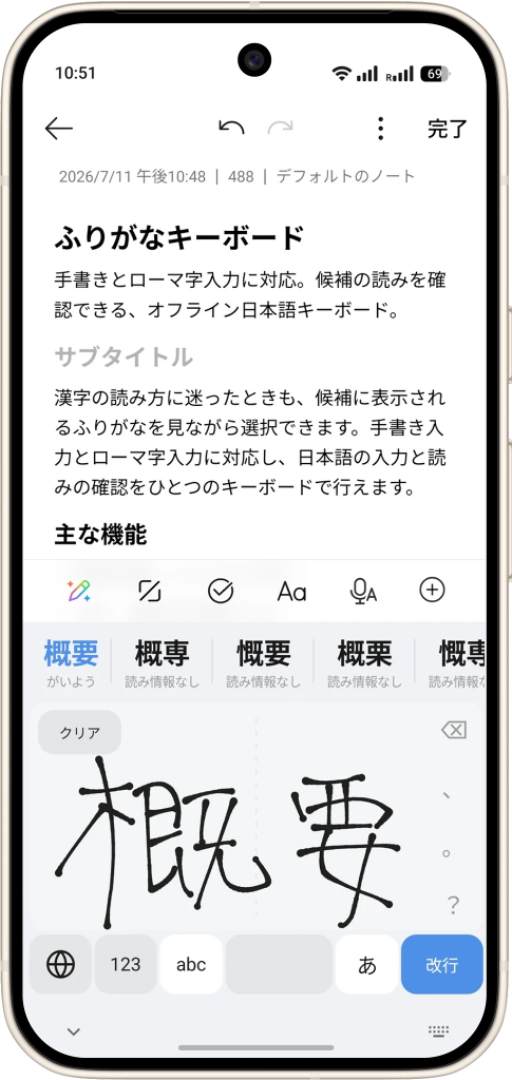
A Japanese keyboard for handwriting and romaji. Choose words from furigana-annotated candidates while checking their readings.
 A WAY INTO JAPANESE.
From handwriting to readings and words.
Write continuously or place one or two characters side by side on the same pad. Recognition runs left to right on your device and offers words with dictionary-verified readings.
Includes Zinnia recognition and reading data from KANJIDIC2, JMdict and JMnedict. It covers hiragana, katakana and 6,356 JIS X 0208 kanji labels, with candidates for names, places and stations.
More than handwriting.
Use Japanese and English QWERTY, symbols, and offline romaji-to-kana/kanji conversion. Up to eight candidates are ranked on-device, with hiragana and katakana alternatives always available.
Show readings in kana or romaji, or hide them. Customize light and dark palettes, haptics and hold-to-delete behavior.
Recognition and dictionary lookup stay on-device.
Both Android and iOS support offline input with the bundled recognizer and dictionary. Handwriting and typed text are not transmitted.
Furigana Plus on Android uses Google ML Kit and downloads an approximately 20 MB Japanese model on first use. It falls back to bundled Zinnia if unavailable and can be disabled in Settings. Network access is used for model delivery and signed dictionary updates.
Good to know.
- Additional Android recognition models and dictionary updates may require downloads.
- Handwriting and typed text are not sent elsewhere for recognition.
- Download the Android edition from this page. The iOS edition is not publicly available yet.